The lab shows a track's bars and phrases on a timeline and lets you put eight hot cues and eight loop starts exactly on them. What you set is kept with the track, and the decks use it: a hot cue pad jumps to its cue, and a LOOP button of the same length starts its loop at the saved start.
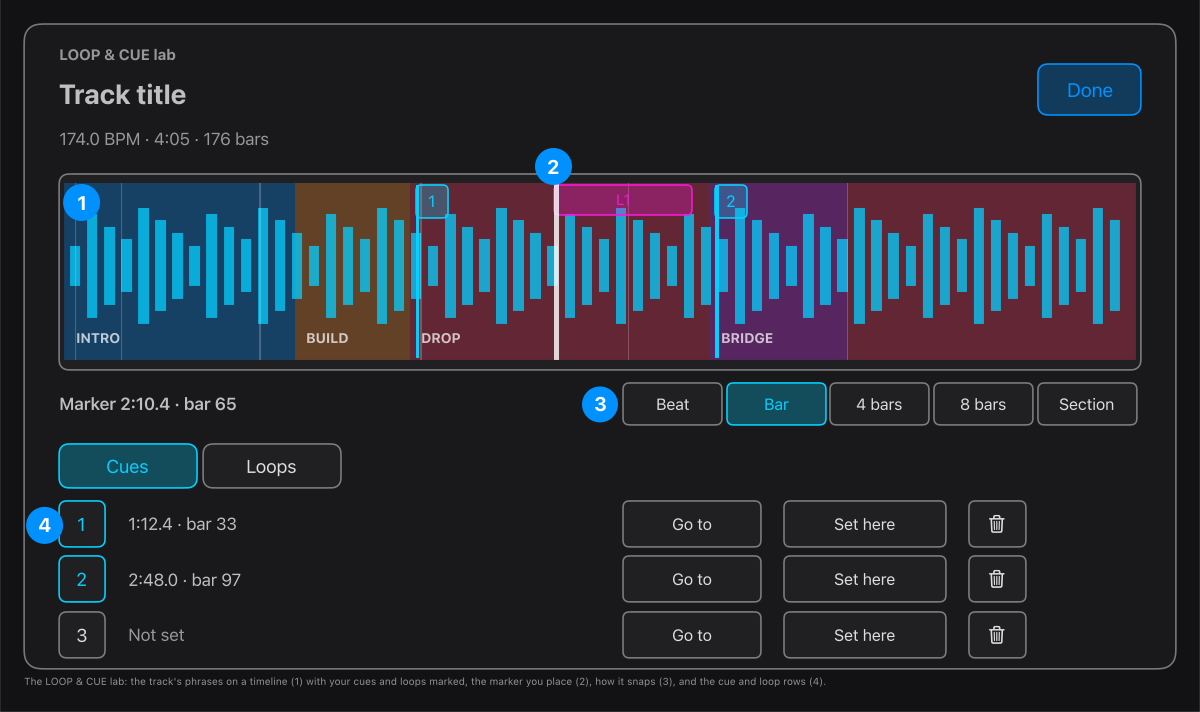
- The timeline: the track from end to end, with its phrases tinted (intro blue, build orange, drop pink, bridge purple), your cues as numbered flags and your loops as bars.
- The marker: click or drag to place it. Press the space bar to play the track from the marker, and again to stop, so you can hear the place.
- Snap: the marker lands on the nearest beat, bar, 4 or 8 bars, or section start.
- Cues and Loops: press Set here to put the marker into a numbered slot, Go to to jump the marker to it, and the bin to clear it. A loop slot also has a length, 1 or 2 beats or 1 to 32 bars.
Open the lab from the CUES and LOOP buttons on any row of the Library or a Set's Mix Queue. A track that has not been analysed shows an Analyse this track button first.
Tip. Quantize (the Q button on the mixer, or the Q key) lines a cue or loop up with the other deck when you press it, so even a press slightly early or late lands in time.