The Library is where every track lives. The side panel chooses what the list shows: all tracks, a playlist, a set or a source folder.
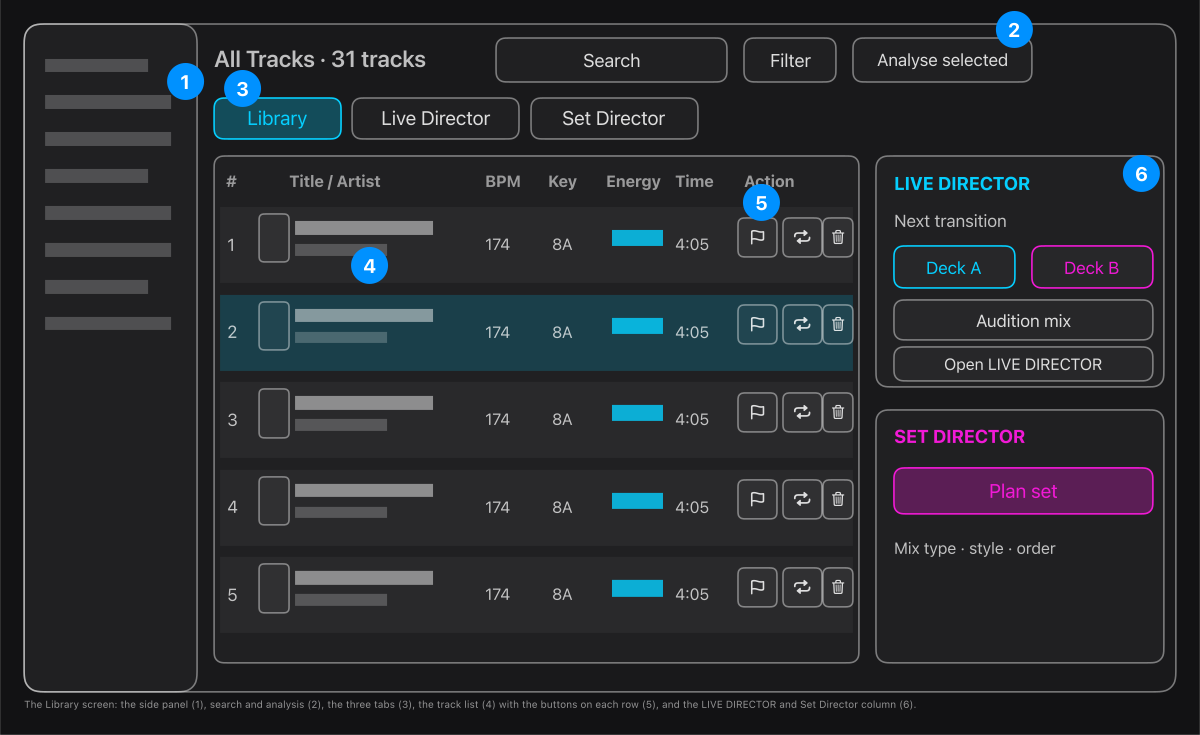
- The side panel: All Tracks, Recently Added, Pending Analysis, then your playlists, smart playlists, sets and source folders.
- Search, Filter and Analyse selected, above the list.
- The three tabs: Library (this list), Live Director (plan and audition one mix) and Set Director (plan a whole set).
- The track list: number, artwork, title and artist, BPM, key, energy, length. A track whose file is not found is shown in red with Track not found.
- On each row: CUES and LOOP open the LOOP & CUE lab for that track, Load A and Load B (on the chosen row) put it on a deck, and the three dots hold the rest.
- The right-hand column: the next transition (both decks, whether it is safe to mix, Audition mix) and the Set Director with Plan set.
Tip. Select a row to show Load A and Load B on it. Double-click a row's artwork or title to rename it from the three dots menu.
Hide duplicate tracks: the Filter menu has a switch for it. A track counts as a duplicate when its file is identical to an earlier one, or it has the same title (ignoring capitals, spacing and a trailing (1) or copy) and the same length within two seconds. For tracks not analysed yet, the same title and the same file name count. The first copy stays.
Remove a source folder: right-click it under Source Folders and choose Remove source folder. After you confirm, the folder and its tracks leave the library, every playlist and every Set. Your audio files are not deleted, and you can add the folder again.